How to Sync Banco Inter to YNAB Automatically
Banco Inter has grown from a small regional bank in Minas Gerais into one of Brazil's largest digital banks, with over 30 million customers. It offers a fee-free checking account, a credit card with no annual fee, an investment platform (Inter Invest), and a cashback programme that rewards everyday spending. If you use Inter and YNAB, you have probably noticed they do not connect natively. YNAB's direct import only covers banks in North America and Europe. This guide shows you how to bridge that gap using Manio and Brazil's Open Finance framework.

Why Inter Users Need an Alternative to Manual Entry
Banco Inter is an app-first bank. Almost everything happens inside the Inter app: account opening, transfers, bill payments, investments, cashback shopping, and credit card management. There is no full-featured internet banking portal like traditional banks offer.
This app-first design is great for day-to-day banking but creates a problem for data export. If you want to get your Inter transactions into YNAB, your options without automation are limited: either type each transaction manually into YNAB, or attempt to use whatever export the app offers, which is minimal at best.
Open Finance Brasil solves this by providing a standardised API that Manio can use to read your transactions and push them to YNAB automatically. Want to understand how Open Finance protects your data? Read our guide on Open Finance security.
Inter and Open Finance Brasil
Banco Inter was one of the first Brazilian banks to fully implement Open Finance Brasil. As a digital-native bank, Inter already had API infrastructure in place, making the integration with the Central Bank's framework straightforward.
Through Open Finance, you can share data from:
- Checking account (conta corrente): Pix transfers, TEDs, bill payments, debit card purchases, and cashback credits
- Credit card: all purchases and instalments from the Inter credit card
- Investments: depending on Open Finance availability, Inter Invest data may also be accessible
The consent process happens entirely within Inter's official Open Finance screen. You log in with your Inter credentials on Inter's own servers. Manio never sees your password.
Step-by-Step: Syncing Inter to YNAB
Step 1: Connect Inter via Open Finance
In the Manio dashboard, go to "Bank Connections" and select Banco Inter. Manio redirects you to Inter's official Open Finance consent screen. Log in with your Inter credentials, choose which accounts to share (checking, credit card, or both), and confirm. The entire process takes place on Inter's servers.

Step 2: Authorise YNAB
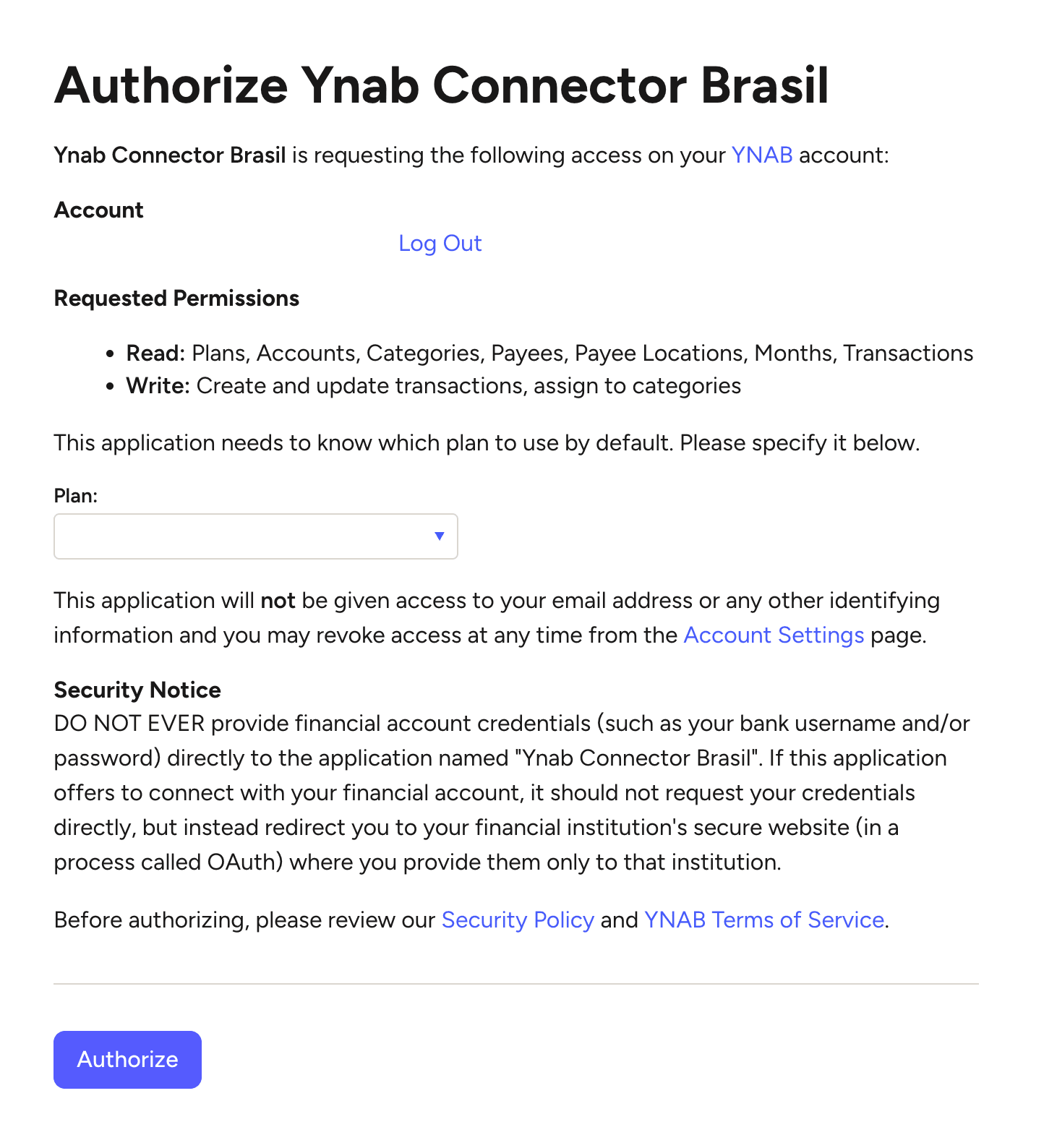
Go to "Destinations" and connect your YNAB account via Manio's YNAB integration. This uses YNAB's official OAuth flow. You log in on YNAB's servers, grant Manio access to your budgets and accounts, and no credentials are shared.
Step 3: Map Accounts
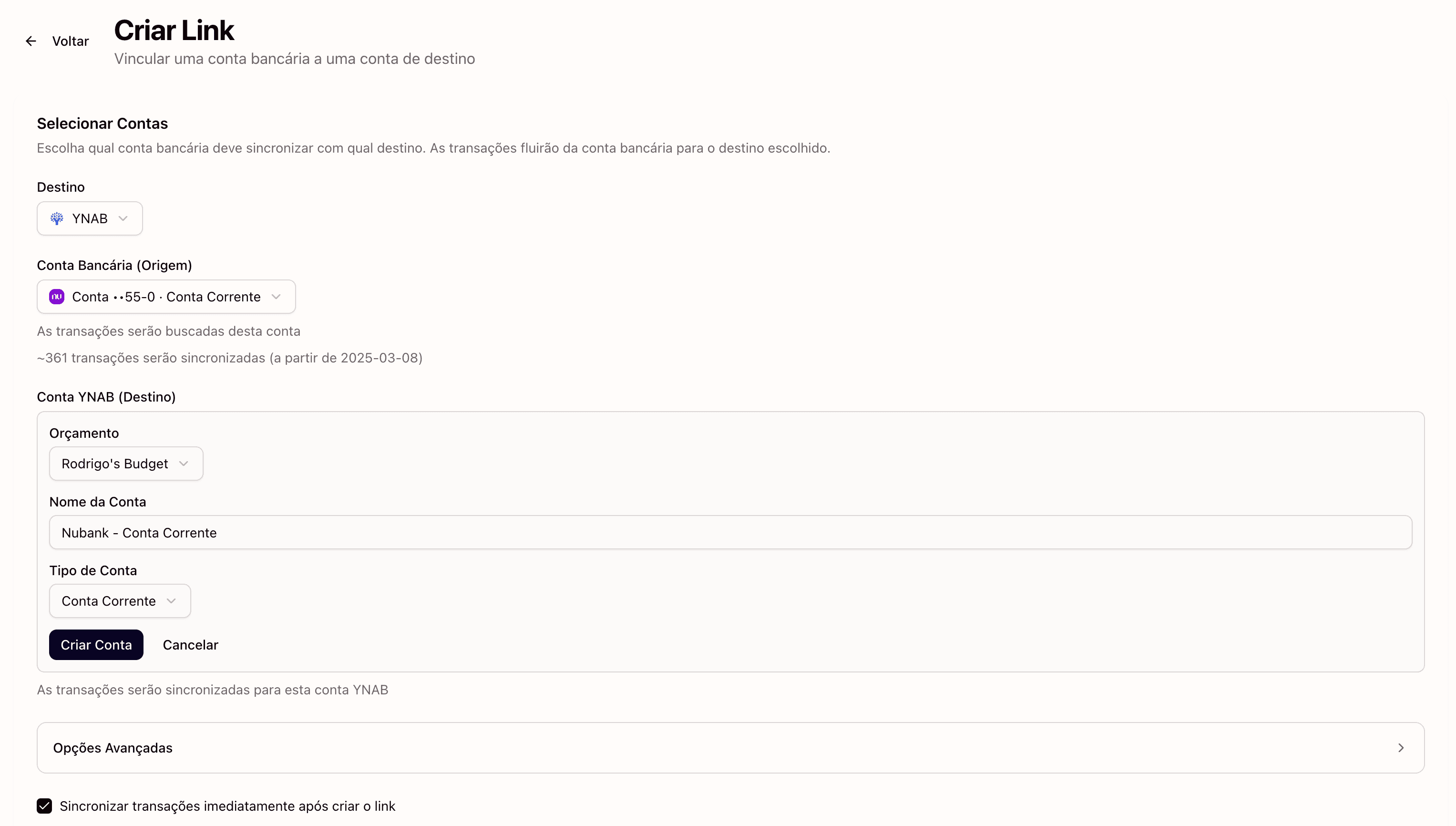
Connect each Inter account to a YNAB account:
- Inter checking account → YNAB "Inter Checking" (type: Checking)
- Inter credit card → YNAB "Inter Credit Card" (type: Credit Card)
YNAB has dedicated handling for credit card accounts: it automatically sets aside money to pay your credit card bill as you make purchases. This works seamlessly with Inter's credit card transactions coming through Manio.
Step 4: Automatic Sync
From this point, Manio polls your Inter data on a regular schedule and pushes new transactions to YNAB. You open YNAB and your transactions are already there. No manual entry, no file exports, no copy-pasting.

What Gets Synced
- Amount in BRL: exact values, including centavos
- Date: settlement date as reported by the Open Finance API
- Payee/merchant: cleaned by Manio for readability in YNAB
- Transaction type: Pix sent/received, TED, debit purchase, credit card charge, bill payment
YNAB learns your spending patterns over time. If you regularly shop at the same supermarket or pay the same subscription service, YNAB will start suggesting the correct category automatically.
Tracking Inter Cashback in YNAB
One of Inter's most popular features is its cashback programme. Purchases through the Inter Shop, card spending at partner merchants, and even bill payments can earn cashback that gets deposited directly into your checking account.
In YNAB, these cashback credits appear as positive (inflow) transactions in your Inter checking account. A good practice is to create a "Cashback" category and assign these inflows to it. Over time, you can see exactly how much Inter's cashback programme is contributing to your finances, which is useful data for deciding whether to prioritise cashback-earning purchases.
Is Manio Worth It for a Fee-Free Bank?
Inter is famous for being fee-free: no monthly account fee, no annual credit card fee, free TED transfers. So it is fair to ask whether it makes sense to add a service on top.
The good news is that Manio's Trial plan includes 1 bank connection, daily sync, and 50 syncs, so you can try it at no cost. The Pro plan (R$24.99/month, or R$239.88/year) adds unlimited syncs, up to 4 banks, sync every 8 hours, full history, and AI categorization.
The answer comes down to time. If you spend 20-30 minutes per week manually entering Inter transactions into YNAB, that adds up to roughly 2 hours per month. Manio eliminates that entirely. Beyond time savings, automation ensures completeness: no forgotten transactions, no entry errors, no gaps in your budget data.
For serious YNAB users who want their budget to reflect reality accurately and completely, automatic sync pays for itself in discipline and data quality.
Duplicate Prevention
Every transaction from the Open Finance API carries a unique identifier. Manio tracks every ID it has sent to YNAB and will never send the same transaction twice, whether from automatic or manual sync triggers. This eliminates the duplicate problem that makes manual CSV imports so frustrating.
Works with Other Banks
If you have accounts at other Brazilian banks alongside Inter, you can connect them all to Manio and map each to a separate YNAB account within the same budget. This gives you a unified view of all your finances in one place.
See also how to sync Nubank, Itau, and Bradesco to YNAB. For a broader overview, check out does YNAB work with Brazilian banks.
If you also want to track your Inter finances in a spreadsheet, check out how to sync Inter to Google Sheets.
Tips for Setting Up YNAB with Inter
- Create your budget in BRL: YNAB supports multiple currencies. Choose Brazilian Real when creating your budget.
- Separate checking and credit card: create distinct YNAB accounts for each. YNAB's credit card system works best when credit cards have their own accounts.
- Use Brazil-specific categories: Aluguel (rent), Supermercado (groceries), iFood/Delivery, Uber/99 (transport), Streaming, Farmácia (pharmacy), Plano de Saúde (health insurance), Academia (gym), Cashback.
- Track cashback as a category: this lets you measure the real impact of Inter's cashback programme on your budget over time.
Frequently Asked Questions
Does Manio have access to my Inter password?
No. The authorisation happens entirely on Inter's servers through the official Open Finance consent screen. Manio receives a temporary read-only token. Your password is never shared.
Are Inter Invest (investment) transactions synced to YNAB?
It depends on what Inter makes available through Open Finance. Currently, checking accounts and credit cards are fully supported. Investment data through Open Finance is being rolled out gradually by banks and the Central Bank.
Do transactions appear in YNAB in real time?
Not in real time. Manio syncs on a regular schedule. In practice, yesterday's transactions are available in YNAB by the next morning.
Can I revoke Manio's access to my Inter account?
Yes, at any time. Open the Inter app, go to Open Finance settings, and revoke Manio's consent. Transactions already sent to YNAB remain, but no new data will be synced.
Does Manio work with Inter business accounts (conta PJ)?
Currently, most banks only make personal accounts (pessoa física) available through Open Finance Brasil. Business accounts are being added to the programme gradually by the Central Bank.